Saturday, 23 February 2019

Awk Tutorial for Beginners

What is AWK?

  • AWK, one of the most prominent text-processing or text filtering utility on GNU/Linux. Very and powerful programming language, solve complex problems in very less line of codes.
  • Its name is derived from the family names of its authors − Alfred Aho, Peter Weinberger, and Brian Kernighan.
  • Maintained by FSF (Free Software Foundation).
  • Basic Syntax of awk is awk ‘options’ file.

Print file using awk?

Its similar to cat /etc/resolve.conf. It prints file content in the console.
awk ‘//{print}’ /etc/resolv.conf
       or 
awk ‘{print}’ /etc/resolv.conf
difference between the above two examples is in the first example it will print or if you want to print a specific line which contains patterns, whereas in the second example it's just print the content in the console, for example,
awk ‘/8.8.8.8/{print}’ /etc/resolv.conf
it will print line which contains “8.8.8.8”. the basic syntax of the first example is awk ‘/pattern/print’ file.
pattern: can be regex or string.
awk ‘/^saurav/{print}’ /etc/passwd.
in the above example line which starts with saurav will print.
awk ‘/*sql$/{print}’ /etc/passwd
in the above example, the line ends with sql will print, likewise. we can use regex to print matching pattern.

Print Column using awk?

By default IFS (Intermediate field separator) in bash is space. similarily in AWK default, IFS is tab or space.
Here is the file which contains 3 columns which I gonna used to explain:
SEQ Name Subject Marks
1) Saurav Physics 80
2) Deepak Maths 90
3) Dhoni Biology 87
4) Kedar English 85
5) Pandya History 89
Printing 3rd column: Here we are going to print 3 rd column
awk ‘//{print $3}’ example.txt
Output:
Subject
Physics
Maths
Biology
English
History
Let see how to print column 2 and 4
awk ‘//{print $2 $4}’ example.txt
Output:
NameMarks
Saurav80
Deepak90
Dhoni87
Kedar85
Pandya89
here we can see awk is printing column which is not separated. if you want to separate columns use ‘,’ (comma).
awk ‘//{print $2, $4;}’ example.txt
Output:
Name Marks
Saurav 80
Deepak 90
Dhoni 87
Kedar 85
Pandya 89

Using printf in awk?

Printf helps here to format the output to print.
For Example:
awk ‘NR>1 {printf “Marks=%d Subject=%s\n”,$4, $3 }’ example.txt
Output:
Marks=80 Subject=Physics
Marks=90 Subject=Maths
Marks=87 Subject=Biology
Marks=85 Subject=English
Marks=89 Subject=History
As you can see in the above example printf function similar in C language works here.

Comparison Operators in AWK:

In awk, you can compare columns and print in the console
For Example:
awk ‘$4 > 85 {print;}’ example.txt
SEQ Name Subject Marks
2) Deepak Maths 90
3) Dhoni Biology 87
5) Pandya History 89
in the above example print the line whose 4 th column (marks) is greater than 85.
So there are different comparison operators
  1. >:greater than
  2. <:less than
  3. >=:greater than or equal to
  4. <=: less than or equal to
  5. ==:equal to
  6. !=: not equal to
  7. some_value ~ / pattern/: – true if some_value matches the pattern
  8. some_value !~ / pattern/: – true if some_value does not match the pattern.
If we want to print the marks of Deepak:
awk ‘$2 ~ “Deepak” { print $0 ; }’ example.txt
Output:
2) Deepak Maths 90
similarily we can get the matching row using comparison operators.

Compound operation in AWK:

In awk, we can combine multiple expression to filter text. We can use && (and) and || (or) operators to achieve this.
Let see some examples.
Print marks of the people who have marks greater than 85 in History.
awk ‘($4 >= 85 ) && ($3 ~ “History”) { print $0 ; }’ example.txt
OUTPUT:
5) Pandya History 89
Print marks of the people who have marks greater than 85 or whose subject is History.
awk '($4 >= 85 ) || ($3 ~ "History") { print  $0 ; }' example.txt
OUTPUT:
2)  Deepak    Maths      90
3)  Dhoni    Biology    87
4)  Kedar    English    85
5)  Pandya    History    89
similarily we can achieve combining multiple expression to filter the text.

Next Keyword in AWK:

next keyword is somewhat similar as continue in a different programming language like java, scala. This really helps when there are the multiple expression to evaluate and the only one you want to print skip rest all the expressions.
For Example:
awk ‘ FNR == 1 {next};
      $4 >= 85 { printf “%s\t%s\n”, $0,”EXEMPTION” ; next} 
      $4 < 85 {printf “%s\t%s\n”, $0,”PASSED”;} ‘ 
 example.txt
Output:
1) Saurav Physics 80 PASSED
2) Deepak Maths 90 EXEMPTION
3) Dhoni Biology 87 EXEMPTION
4) Kedar English 85 EXEMPTION
5) Pandya History 89 EXEMPTION
In the above example as we can see
first line FNR == 1 {next} check if its first line or row then go to next.
second line $4 >= 85 { printf “%s\t%s\n”, $0,”EXEMPTION” ; next} itcheck if the 4th column(marks) is greater than 85 then print and go to the next line .

Variables and Numeric Expressions:

Variables are place holders which store some value which stored in memory like other programming languages.
Syntax:
variable=value
Example:
marks=10
name=saurav
Numeric expressions are the expression which does numeric expressions. Like adding or dividing some numbers similar to other programming languages.
Syntax: operand operator operand
Example:
var1=1
var2=2
var3= var1 + var2
Let see some examples:
Print line number with every line in the console.
awk ‘FNR==1 {next};
line= $0 //store content reads by awk
{ line_no=+1 ; printf “%d\t%s\n”, line_no,line ; }’ //  increment line_no with every line read
example.txt
OUTPUT:
1 1) Saurav Physics 80
2 2) Deepak Maths 90
3 3) Dhoni Biology 87
4 4) Kedar English 85
5 5) Pandya History 89
Happy Coding :).

Tuesday, 12 February 2019

Basic tutorial of SED (Stream Editior) for beginners

What is SED?

Sed is stream editor and ultimate editor (non-interactive text editor)for modifying files automatically. Commonly used in the Linux/Unix based system. Sed inputs in the form of a stream and update the stream or input depends on the instructions.
Many System developers or admins use this commands on daily basis to update or replace text or filter from the strings or files.

How to use?

I will use the given file reference to explain the commands:
for seq in `seq 1 5`; do echo “CAT_$seq” >> exp.txt; done
the above command will create file “exp.txt” which has content CAT_1 . to CAT_5 separated by lines.

Delimiter IN SED:

Most of the people know that only ‘/’ slash is a delimiter this is a myth you can use like “|”, “,”, “_”, “:” etc.
Example:
echo "CAT"| sed 's:CAT:DOG:'
echo "CAT"| sed 's|CAT|DOG|'
echo "CAT"| sed 's_CAT_DOG_'
echo "CAT"| sed 's;CAT;DOG;'
echo "CAT"| sed 's,CAT,DOG,'
so all above command yields the same result.

How to print line no using sed:

Using “=” we can print line and line no:
Example:
sed ‘=’ exp.txt
OUTPUT:
1
CAT_1
2
CAT_2
3
CAT_3
4
CAT_4
5
CAT_5

Print file using SED:

Example: Print from line no1 to 5.
sed '1,3p' exp.txt
OUTPUT:
CAT_1
CAT_1
CAT_2
CAT_2
CAT_3
CAT_3
CAT_4
CAT_5
By default, each line of input is printed to the standard output, after all of the commands have been applied to it to suppress this behavior we have -n
sed -n '1,5p' exp.txt
OUTPUT:
CAT_1
CAT_2
CAT_3

Print Non-consecutive lines:

How to print non-consecutive lines like print from line 1to3 and 5.
Example:
sed -n -e '1,3p' -e '5p' exp.txt
Output:
CAT_1
CAT_2
CAT_3
CAT_5
Here we have used -e flag basically means append the editing commands specified by the command argument to the list of commands.
it’s similar to execute multiple sed commands same as below.
sed -n '1,3p'  exp.txt ; sed -n 5p exp.txt

Delete Lines and Print:

How to delete or remove some of the lines and print rest all the lines.
Example:
sed '3d'  exp.txt
so above command delete 3rd line and print all the lines.
Output:
CAT_1
CAT_2
CAT_4
CAT_5

Inserting spaces in files:

Using “G” we can insert an empty line with every non-empty line present in the file.
Example:
sed ‘G’ exp.txt
Output:
CAT_1
CAT_2
CAT_3
CAT_4
CAT_5
you can also do sed ‘G; G’ exp.txt to insert 2 blank lines, similarly, no of G’s separated by semicolon insert blank line same as no of “G”

In Place Editing in Sed:

Using the “-i” flag we can edit the file in place and changes are updated in the same file without printing output of file in the console.
Example:
sed -in 's/CAT/DOG/' exp.txt
Output:
DOG_1
DOG_2
DOG_3
DOG_4
DOG_5

Occurrences of pattern in SED:

Without giving any occurrence first matched character is replaced on giving “g” flag all occurrences are replaced. In case if you want to modify a particular pattern in sed then you can do like below.
Example:
echo "CAT CAT CAT CAT CAT"| sed 's/CAT/DOG/2'
OUTPUT: CAT DOG CAT CAT CAT
as you can see in the above example the second occurrence is replaced.
if you want to replace from second onwards you can do like this
echo "CAT CAT CAT CAT CAT"| sed 's/CAT/DOG/2g'
OUTPUT: CAT DOG DOG DOG DOG

Command S for substitution:

it will replace the occurrence of pattern to a newly given pattern

Replace String using String:

Example: Let's replace CAT_2 to DOG_2
sed ‘s/CAT_2/DOG_2/’ exp.txt
          or
cat exp.txt | sed 's/CAT_2/DOG_2/'
OUTPUT:
CAT_1
DOG_2
CAT_3
CAT_4
CAT_5
It will replace CAT_2to DOG_2
Note: Most of the Linux utilities works on reading the file line by line similarily sed works, in the same way, it will replace the first occurrence of pattern and go to next line if you want to replace all the occurrences then use “g” means global.
Example:
sed ‘s/cat_2/DOG_2/g’ exp.txt
or
cat exp.txt | sed 's/CAT_2/DOG_2/g'
We can also uses a number instead of “g” which will tell every number th position character is replaced
Example:
echo “my name is name and name” | sed ‘s/name/saurav/2
Output: my name is saurav and name
second position name is replaced with saurav

Replace String using REGEX:

Example Replace CAT from DOG
sed ‘s/^CAT*/DOG/’ exp.txt
OUTPUT:
DOG_1
DOG_2
DOG_3
DOG_4
DOG_5
Sometimes we used -E flag while regex matching in sed for example
sed -E ‘s/^CAT*/DOG/’ exp.txt
This is an extended regular expression flag, this means the behavior of a few characters: ‘?’, ‘+’, ‘()’,’{}’ etc does not require to escape while in regular (or not using -E flag) we need to escape. Extended regular expressions have more power than normal
Example:
, but sed scripts that treated “+”
echo “123 abc” | sed ‘s/[0–9]+//’
Output: 123 abc
echo “123 abc” | sed -E‘s/[0–9]+//’
Output: abc
so in above example as you can “+ ” is special character when use “-E” sed take as regular expression where as without “-E” sed take as normal string.
That's it after going through this article you can get an idea of how sed works and different flags present in flags. Some of the flags are not covered like”r” (for reading from the file), “w” for writing in file etc. these are basic and easy sed flags.
In case of any doubts or concerns please comment below.
Happy Coding . :)

Sunday, 3 February 2019

What is Journalling File System and Journalling in MongoDB


I am going through mongo internal architecture it uses journalling. I thought why i also add some points to it.

What is Journalling?

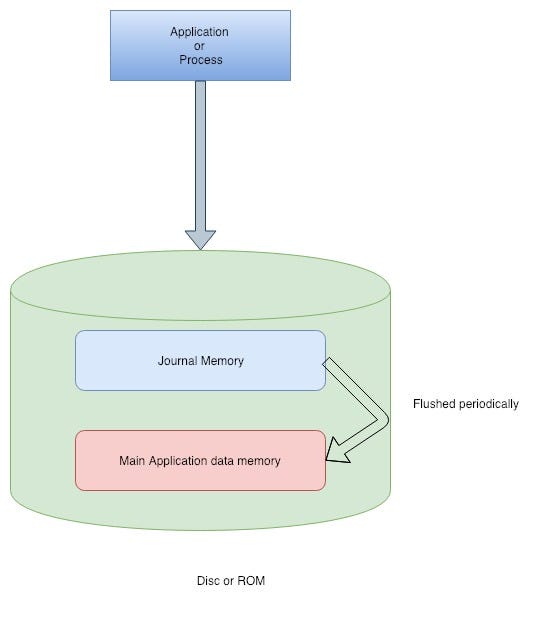
  • Journalling is another file system where we keep records which are not yet updated or committed to file system’s main part (where all the data for particular application resides in the disc, example MongoDB writes in /data/db). Records are known as a journal. which is another circular records or logs.
  • As we all know to access data from the disc, disc head(read or write head) to move to that corresponding track and sector. (how Disc reading and writing works ? is out of scope. Google it). so the time taken to move from one track to another track called as seek time. If data is randomly distributed then seek time will be more.
  • In journaling, all the records or journals written in consecutive tracks (similar as an arrays data structure)so that seek time will be very less as compared to random access. this is the main benefit of journalling.
  • If we write data to file system’s main part then it will be slow and slows down overall processing.
  • So in MongoDB first data is written to journal and periodically it gets flushed on main MongoDB memory.
  • The main benefit of this is increase processing time and if system or application(MongoDB) is crashed then it starts again frequently.
Now you have a basic understanding of Journalling, will jump into how journalling works in MongoDB.

Journalling in MongoDB:


  • When writes operation is done in MongoDB, first changes is done in private view, after a specified interval, which is called a journal commit interval, the private view writes those operations in journal directory (residing in the disc). 
  • After journal commit happens or written in journal memory then MongoDB pushes data in the shared view. After a specified interval of time (default 60 secs). it copied to the main directory of MongoDB.
  • After data is flushed in the main MongoDB directory then it is marked as processed and removed from journal memory.
  • So whenever any crash occurs then data MongoDB starts very frequently because data is cached in journal memory.
  • Private view and shared view are allocated space in RAM. (Memory mapped file) or main memory. Say for example if your file is 2000 byte on disk then it will map it to memory address 1000–1000010, so you can read the file directly from memory address. Any change in the file from memory address will be flushed back to file in your disk.
This is the basic concepts behind the journalling of MongoDB. Private view add another level of caching data so that MongoDB reboots faster.

Tuesday, 29 January 2019

G1 Garbage Collector in Java


G1 is introduced in Java7. Oracle 9 Hotspot JVM comes with default G1 Garbage collection. 
One of the good property of this is you can configure this for maximum pause time using flag: 

-XX:MaxGCPauseMillis=n.

Lots of real-world studies say most of the objects (90%) garbage collected in a young generation or in first garbage collection or minor GC (also it depends upon applications). Who survived a couple of GCs(major GC), present in old memory (old objects) they will remain survive more than 95% times.
Explaination on G1 Garbage Collector:
  •  It does most of the work concurrently.
  • It uses non-continuous which enables G1 to deal with the very large heap efficiently.
  • Instead of dividing heaps into 3 spaces (old) like other Garbage Collectors like CMS (concurrent mark and sweep), Parallel etc.
  • it divides heap memory in small chunks. These regions are fix-sized (about 2Mb by default). like below
U: Unassigned, O: Old, S: survivor, E: eden
  • Splitting into small regions helps G1 concurrently run and finish it off very quickly. 
  • While running GC on Eden space all the survived objects get copied to unassigned space. The unassigned space becomes survivor space.
  • If all the objects in Eden space are garbage then it can be declared as Unassigned.
  • G1 is not run on whole heap memory at once like others Garbage Collectors, instead of this it always selects the regions which are full or almost full to minimizes the amount of work to free heap space.
  • G1 only stops the application at the beginning of the GC for bootstrapping , this phase is called as Initial Mark.
  • While Application is executing it follow all the references and mark live objects, this phase called as Concurrent Mark.
  •  When above phase(Concurrent Mark) is done then application again stops. for final cleanup is made, this phase called as Final Mark.
  •  To move objects and reclaim heap memory, this phase called as Evacuation phase this phase is fast, called as Evacuation Phase.
  • This is not good for small heaps then it that case might be full GC is performed and might slow down overall executions. In that case increase the heap size or other Garbage collectors can be used.
Many properties and optimization can be used for G1 Gc. will be covered in an upcoming post.

Wednesday, 23 January 2019

Adder and Accumulator in JAVA8

Java 8 introduces lots of improvement like Stamped Locks Locks, Parallel Sorting Long or Double Adder and Long or Double Accumulator and lots of improvement.
LongAdder and LongAccumators they were present under java.util.concurrent.atomic.
LongAdder and LongAccumators which are recommended instead of the Atomic classes when multiple threads update frequently and less read frequently. During high contention, they were designed in such a way they can grow dynamically.

Atomic classes(AtomicLong or AtomicDouble) internally uses a volatile variable, so for any operation data need to fetch from memory which requires many CPU cycles, under heavy contention lot of CPU cycles has been wasted.

So LongAdder and LongAccumator design in such a way they use its local values for each thread and at last they can sum all the values. Internally they use cell object array which can grow on demand where the store value. More threads are calling increment(), the array will be longer. Each record in the array can be updated separately.

The code below shows how you can use LongAdder to calculate the sum of several values:

LongAdder counter = new LongAdder();
ExecutorService service = Executors.newFixedThreadPools(4);
Runnable incrementTask = () -> {
  counter.increment()  ;
};
for (int i = 0; i < 4; i++) {
          executorService.execute(incrementTask);
}
// get the current sumlong sum = counter.sum();


The result of the counter in the LongAdder is not available until we call the sum() method. This method iterates over the cell array and sums up all the value.

Adder class is used, to sum up, or adding the value, whereas Accumulator classes are given a commutative function to combine values or perform some action.

The code below shows how you can use LongAccumulator to calculate the sum of several values:

LongAccumulator acc = new LongAccumulator(Long::sum, 0);
ExecutorService service = Executors.newFixedThreadPools(4);
Runnable incrementTask = () -> {
  acc.accumulate()  ;
};
for (int i = 0; i < 4; i++) {
          executorService.execute(incrementTask);
}
// get the current sumlong sum = acc.get();

Here we have passed the sum function of Long class accumulate function will call our sum to function.

These classes implementations are very clever implementations in java8 they save a lot of CPU cycles and increasing the overall speed of execution of the process


Wednesday, 16 January 2019

Zero Copy in Linux

Most of the people already heard of Zero-Copy in Linux but very fewer people understand how it works because underneath it requires some operating system concepts.
Lets first understand how sending of data to the network works.

As we can see from the diagram:
  1. Read system call causes a context switch from user mode to kernel mode. DMA engine reads the file contents from the disk and stores them into a kernel address space buffer.
  2. Data is copied from the kernel buffer into the user buffer, and the read system call caused a context switch from kernel back to user mode and return.
  3. To write the data to the socket, data is copied again from user context to kernel Context (Socket Buffer) and then sends to the network interface.
As we can see, it’s redundant to copy data between the Kernel Context and the Application Context. Using Zero Copy we can copy data directly from the Kernel Context to the Kernel Context.


So in Zero Copy we can bypass userspace entirely using the sendfile system call, which will copy the data directly from the to the Socket buffer. This turns out to be an important optimization which saves lots of CPU cycles, memory bandwidth.
Apache Kafka Uses Zero Copy for fast data transfers.


Generating Unique Id in Distributed Environment in high Scale:

Recently I was working on a project which requires unique id in a distributed environment which we used as a  primary  key to store in dat...